Agent Office.
Your AI company.
You sign off.

Agents plan, build, test and ship. Nothing moves without your signature.

A desktop app where a team of AI agents works in your real project folders. A CEO plans in phases, a PM runs git, specialists build at their desks, and you review every result before it counts.

Early access for macOS. Windows build in testing.

The 98-second tour.Recorded from the app in Demo mode: simulated agents, the real interface.

One brief.
Five handoffs you can see.

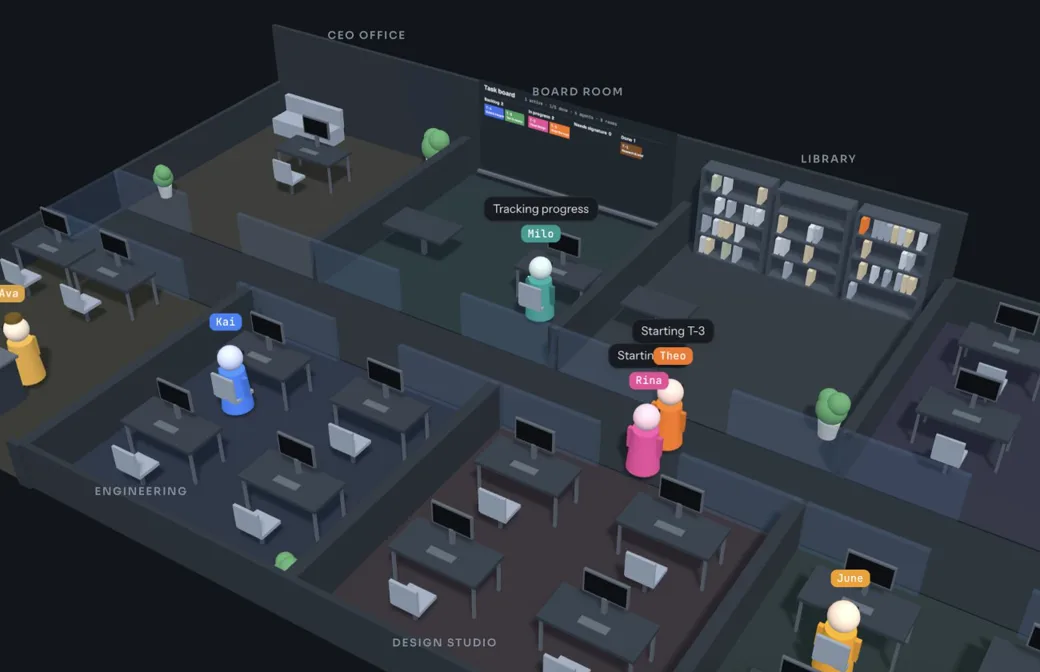
Watch the work move through a 3D office: agents walk to reception to ring the sign-off bell, type at their desks, and hand results to each other.

  1. 1BriefYouPick a folder. Say what you want built.
  2. 2PlanCEOPhases and steps you sign before work starts
  3. 3BuildSpecialistsEach task on its own git branch
  4. 4ReviewYou or a reviewerDiffs, comments and review rounds
  5. 5ShipQAA deploy, or a result you can try

Fast agents.
Your hand on every handoff.

Agents do the work. The office decides what needs you, keeps your code safe while they do it, and remembers every decision.

Planning

A plan before any work.

The CEO reads your project folder and returns a structured plan in phases, with a specialist named for each step. Sign it, or send it back with a note and get a revision.

  • Phased plans
  • Specialist assignments
  • Revision rounds

Building

Work that can’t trample your code.

Every task runs on its own git branch in a separate worktree. The PM merges finished work and asks before anything reaches your main branch. No repository yet? It sets one up when you sign.

  • Task worktrees
  • Merge reviews
  • Conflict handling

Reviewing

Review that remembers what you said.

Each result opens with a diff and a comment box for every changed file. Send it back and the next round shows only what changed since your last look. Work resubmitted unchanged goes back to the agent before it reaches you.

  • Per-file comments
  • Since-last-review diffs
  • Signed decision log

Safeguards

A bell for anything risky.

Deleting files, installing packages, git push, deploys, sudo or writing outside the project stop the agent at reception until you decide. Auto sign-off lets reviewer agents approve routine work; risky actions stay with you unless you hand them over.

  • Sign-off bell
  • Opt-in auto sign-off
  • Owner-only actions

Shipping

Results you can open.

After a deploy you see where it’s live. Otherwise QA prepares a Try-it card: the command to start it, what to check, and a box that sends your findings back as a follow-up project.

  • Deploy sign-off
  • Try-it handover
  • Follow-up projects

Hire from
283 specialists.

Staff the office from the open-source agency-agents catalog: frontend developers, game designers, SEO strategists, reality checkers and more. Swap any agent’s specialty, pick its model, and watch it work from a desk in its department.

Specialist personas come from the agency-agents project, MIT licensed.

The Zorveq Agent Office 3D office from above: agents at desks in engineering, design and QA rooms, with status bubbles over their heads.

Runs on your plans.
Stays on your machine.

Works with
Claude Code and OpenAI Codex, signed in with your own Claude or ChatGPT plan. More AI providers are planned.
Spending
Agents pause before paid usage credits kick in. Set an optional monthly budget, or use your plan’s API credits with a cap.
Your projects
Agents work in folders you choose, on your computer. Every decision and signature is kept in a local log.
Availability
Early access for macOS. The Windows build is in testing.
Read the first-project guide: brief, plan, review and sign off

Be among the first
to run an AI company.

Tell us what you’d build first. We’ll get in touch as early access opens.

Request early access